Helpful Content Update Sep 2024: what lessons can we learn for our next content strategies?
On September 14, 2023, the Google Search Central X (Twitter) account announced late in the evening the launch of an update to SEO results based on “Helpful Content” criteria. The Helpful Content Update was completed on September 28, according to an official announcement. Since then, several other announcements have been made (October Spam Update, October Core Update), but that doesn’t prevent us from examining the implications of the Helpful Content Update for current and future content strategies.

Defining Useful Content
Usefulness is a very relative concept. There wouldn’t be a single webmaster frustrated by drops in performance if we all agreed on the criteria for usefulness. Just look at the arguments that can break out during the famous spring cleaning or at an IKEA store! No, not everyone agrees on the concept of usefulness. We even tend to overestimate the value to the rest of the world of something we own or have created ourselves.
The distinction between “helpful” and “useful” could be significant. “Help” implies someone stepping in to select information to provide. Something “helpful” can think outside the box by offering new perspectives on a subject. “Useful” could be summed up as something practical and functional. But these are just semantic hypotheses. It’s a safe bet that no one really has time to ask themselves these questions. Yet another illustration of the concept of relative utility. This paragraph may have served no purpose at all. On his personal account, John Mueller notes that the launch of this Helpful Content Update would be a good time to do some pruning.

Content pruning is a method that literally involves pruning a website's site map. This allows you to sort through content and concentrate PageRank on selected parts of the site.
Factors that make a website useful or useless.
Sorting through your content allows you to reassess the value of not only your specific content but also your pages in general. By pruning your content, you also simplify your website’s structure for even greater efficiency. Here are some ideas to explore:
|
Useless? |
Useful? |
|
Uncontrolled indexed pagination. Empty author pages. Tag pages that are identical to one another. Faceted navigation without specific content in the filters. Content plagiarized from another source, without even citing it. Internal content duplication. Pages that discuss places without a significant presence in the area in question. |
Address a common need related to a popular and well-known search query. Addressing a niche topic is less common or popular, but no less relevant. Unique information whose relevance is supported by authoritative criteria. Feedback, an opinion, or a recommendation. Consistency between the page's content, its title, and the way the content is organized within the website's structure.
|
According to the Helpful Content System documentation, a single page that is less relevant, useless, or even of poor quality (let’s be honest) can impact the entire website. This means that a domain could be penalized during an update or automatically simply because some of its content is disappointing. This is an automatic weighting of the authority criterion. The concept of “people-first content” is also one of the criteria that Google emphasizes.
Action Item: Promote a predictable website structure.
Even though we know that Quality Raters and manual penalties exist, it’s clear that search engines operate primarily through automated processes. This is essential for meeting the challenge of crawling, indexing, and analyzing the entire Web. We could also assume that the application of anti-spam filters and developments aimed at improving the relevance of results are simply ways to sort through the vast amount of data that needs to be managed. Is the Content Helpful Update the Marie Kondo of Google’s search results page? Even though Marie Kondo has given up the fight.
Don't underestimate or overestimate the relevance of your content.
It’s relatively unlikely that your idea is absolutely exceptional and that you were the first to think of it, if we look at it from the perspective of humanity as a whole. However, you may still be the first to come up with the right idea—that is, to communicate your idea before others do.
Communicate with the robot by establishing a comprehensible semantic ecosystem.
The robot knows how to learn. In fact, that’s all it does. It makes connections between ideas and cross-references vast amounts of data and information related to user expectations. Although we’re dealing with algorithms that are becoming increasingly complex—and therefore increasingly sophisticated—the overall logic is relatively predictable. Consequently, instead of hoping that the robot will think like a human, let’s think like a robot and use that perspective to demonstrate the added value of our own websites to it.
Even though the bot doesn’t automatically know whether what we’re telling it is relevant or not, we can take it for granted that Google learns (not the company, but the search engine). Let’s guide them and make the learning process as easy as possible for the bots. Obviously, the goal of all this is to convince the bot that our content—our website—is the most relevant in its field.
Ultimately, that is probably the true purpose of SEO: to implement everything we can—both technically and editorially—so that the search engine crawler understands the site and gives it the value it deserves.
The ongoing nature of the Helpful Content Update—which gradually adjusts the scores assigned to websites—supports this idea. Useful content that isn’t highlighted today may very well be highlighted tomorrow, as the search engine will have learned from it.
Encouraging a Holistic Approach to Website Design
The idea that a website could be penalized because of a single page encourages us to think of a website as a holistic experience.
Several internal linking strategies are already in place to help the crawler navigate from one page to another in order to pass on link equity. But as is often the case, different perspectives and strategies can complement and contradict each other… at the same time.
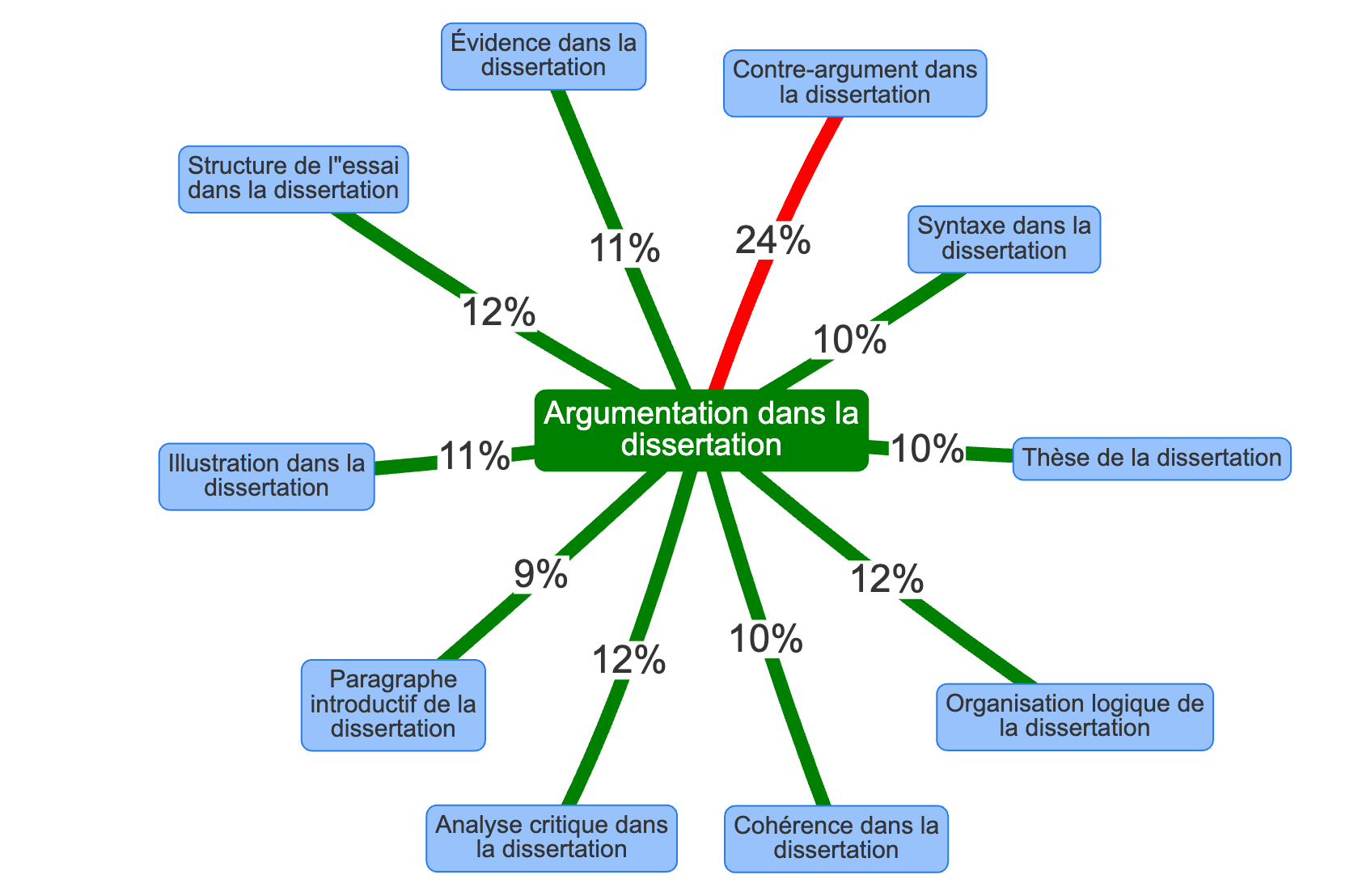
Semantic Environment Around “Essay” by Creating a Semantic Cocoon in YourText.Guru.
1 page, 1 keyword, 1 search intent, 1 URL
The concept of content uniqueness often leads us to design a page as if it were a free agent: an independent entity that should contain all possible information on the topic at hand. Similarly, we frequently recommend putting the page into context for the user by reminding them—through design elements, menus, or sidebars—what kind of site they’re on. All paratext is useful. Among other things, this helps ensure that a user isn’t caught off guard by a CTA if they’ve already recognized that they’re on an e-commerce page.
But putting things into context is also very useful in cases where the page receives traffic from SEO or social media. It would be misleading to assume that a user necessarily starts from the home page and then navigates the website in a systematic way, as if following the outline of an essay.
Yes, following the best practice of assigning specific content to a single URL is a good idea. It’s also a recommendation that’s prone to overinterpretation. Very often, we encounter situations where clients don’t want to address a certain topic because it might create duplicate content. In those cases, we need to take the time to educate the client as well, explaining the distinction between a topic and a perspective. Similarly, it’s important to force yourself to view your own website through the eyes of someone who isn’t familiar with it. The questions that seem most important to us aren’t necessarily the ones that users ask—and vice versa.
Demonstrate the relevance of your website to search engines
Search engines learn just like we do; that’s what they’re designed to do. They observe and then draw conclusions. This only underscores how important it is for a search engine to have technology that allows it to crawl and process vast amounts of data.
Search engines’ ability to analyze content is becoming increasingly sophisticated. This in no way means we should stop optimizing. In the vast majority of cases, all the optimizations we might recommend benefit both the search engine crawler and the user. Why refrain from optimizing content by adding a table of contents and internal links, if doing so helps the crawler identify pages with high semantic proximity while also guiding users to additional information?
Show us why you’re the most relevant site on the web. How can we possibly know that without you telling us how easy your site is to navigate? How can we be convinced of the value of your services if you don’t tell us about them? With the right people? What’s the value of your network and expertise if we never read a single sentence from one of your most prestigious partners?
Treat each format and piece of editorial content as a tool for demonstrating its relevance
Here are 15 types of content you can include on a website, organized by their key considerations.
1. Home Page
- General overview of the brand and the website's objectives. Make it clear what it is: e-commerce, rental service, educational resources?
- Ensure internal linking to the most strategic pages. The homepage is updated based on current events.
2. Services Page
- A description of the service pages.
- Skillfully combine brand messaging, user experience, and SEO optimization.
3. Product Page
- A detailed description of a product.
- Provide sufficient technical information to address any barriers to purchase and facilitate the sale. Be careful to avoid duplicating internal content.
4. A blog's home page
- Articles are listed and linked internally in a predefined order. Reverse chronological order is the most common. The way specific articles are highlighted is clever.
- Adjust the site map to include deeper-level pages based on current events to direct both the search engine crawler and users to strategic pages. Be vigilant about internal content duplication, which is common depending on how tags and pagination are managed through the CMS configuration.
5. Blog post
- Content that is inherently time-sensitive and may therefore become obsolete.
- An opportunity to develop the content and demonstrate its relevance by updating it. A distinction is made between the publication date and the edit date.
6. “About” or “Who We Are” Page (Authority)
- Presentation content. It may present the history, values, goals, and aspirations of a person, an organization, a company, etc.
- The format is relatively open-ended. Feel free to get creative. Content that instills confidence and asserts your authority in your market or highlights your professional journey. Similar “brand content” pieces offer opportunities for stories and columns.
8. Guides and Evergreen Content
- Static content that, unlike a blog, is less affected by the passage of time.
- An interesting format to structure so that each search query is assigned its own page. Stand out from the competition with unique sources. Internal linking is essential.
9. FAQ
- Content that can have its own section or be incorporated into existing pages.
- Answer simple questions that are often related to search queries or customer service requests.
10. Testimonials and Case Studies
- Demonstration of the quality of services and products.
- Encourages input from outside parties with concrete and tangible information. Ideal for partnerships.
11. Guest Blogging and Op-Eds (Expertise)
- Guest content featuring experts in fields complementary to the main topic. Enhancing the site's relevance.
- Enhancing the network.
13. Video Content
- Multimedia content. If hosted on your own website, pay close attention to loading times.
- Boosts visibility across various platforms (Google Video, YouTube, etc.). Transcripts and subtitles provide textual content.
14. Infographics
- Graphic content. May be presented as a large image or a combination of formats (text and images).
- Content has become complex in responsive design. Relying entirely on images requires equivalent text descriptions.
15. Podcasts
- Audio content, whether in the form of episodes or not. Can be distributed across multiple channels.
- Real or computer-generated speech offers a very interesting alternative to text-based content of any length.
In summary
In September 2023, Google Search Central launched the Helpful Content Update, marking a shift in SEO. This update emphasizes the need to provide useful, high-quality content, prompting website owners to rethink their approach to content. Content pruning has become essential for weeding out unnecessary content and concentrating PageRank. Every content format—whether homepages, blog posts, testimonials, videos, or infographics—must help demonstrate the site’s expertise. Furthermore, it is crucial to understand that search engines are constantly learning from the content they analyze, which underscores the importance of creating a coherent semantic ecosystem. In conclusion, the Helpful Content Update encourages content creators to think holistically, provide relevant information, and demonstrate their value, while adapting to changes in SEO to optimize their online visibility.