7 Antidote Features for SEO Copywriting
Antidote is one of the most popular software programs in the field of writing, whether for web content or for any profession that involves frequent writing. I highly recommend that everyone have a reliable proofreading tool at their disposal. Unfortunately, we’re only human, and even the best of us make mistakes! But beyond simple spelling and grammar correction, today I’d like to share with you the seven features of Antidote that I find particularly valuable.
Visit the software's website: Antidote.info
The screenshots were taken using Antidote 9.
1 – Synonyms for Proper Nouns
When you work in the travel industry, for example, you often find yourself repeating yourself. The software’s thesaurus is interesting and already quite useful, but did you know that you can also find equivalent terms for proper nouns?

Synonyms for "France"
This provides insight into the nicknames given to a place or a person. In addition to simply varying the vocabulary—which is always welcome for stylistic reasons—this practice also offers the opportunityto enrich the content with interesting added value.
2 – The lexical field
A domain’s lexical field encompasses all the terms related to that domain. When I start an editorial project, having an interactive guide organized by part of speech (nouns, adjectives, adverbs, proper nouns, verbs, etc.) is incredibly helpful. When diving into a topic, it provides a great overview of the vocabulary you can use. Above all, you can quickly find the various terms that are specific to a particular sector. For example, while working on a project for ready-to-wear fashion, I was delighted to have a list of verbs such as “to make” and “to craft.” This saves time when diving into a project and makes it easy to enrich your text.

Look up verbs commonly used in the semantic field of “clothing” to enrich your writing with specific terms.
Look up verbs commonly used in the semantic field of “clothing” to enrich your writing with specific terms.
3 – The Nano Visual
For me, the “nano visual” is a tool for conducting documentary research. I’ve used the example of ready-to-wear clothing here. Thanks to this documentation, which is directly accessible in Antidote, I can see the validated terms for different types of skirts. Handy, isn’t it?
An enhanced version is available as an option, featuring a larger display and interactive captions.

Excerpt from the nano visual for skirts following a search for “clothing”
4 – The “Details” module in the definitions
Here’s a really useful feature. It helps clear up any uncertainty about certain spellings, or simply allows you to make an informed choice when there are several valid options. No need to argue over a spelling error—which might not even be one—let’s make decisions based on concrete information!

Excerpt from the “Details” module for the word “event”
5 – Detecting Repetitions
No matter how well-educated you may be, unfortunately, when it comes to writing, you only have one brain at a time. However, even if you’re sought after for a particular skill set—or even your personality—repetition is viewed very negatively in French. And when it turns into redundancy, it’s even worse. It’s very easy—especially when you’ve been working on the same subject for a long time—to end up using the same terms or expressions. Spotting repetitions is also a way to prevent boredom!
By highlighting terms, you shift your perspective compared to simply rereading the text, and you gain some distance from it. I can clearly visualize how often the same word appears in its various forms (for example: reason, reasons, reasoned, reason…).

Excerpt from: “Discourse on the Method” by René Descartes
6 – Identify terms with negative connotations
Here’s a very useful feature when you’re writing for others, and the content addresses a very specific issue. For promotional text, for example, I particularly like to open the “Semantics” menu in the spell-checker to display terms with negative connotations. You can also view the positive terms, but either way, it’s really helpful. When writing, it often happens that a term isn’t perceived quite the same way by the reader. I remember one time when I wrote “versatile” to describe an object that adapts to any situation. My contact then pointed out that, to him, “versatile” had negative connotations, bringing to mind the adjective “capricious.”
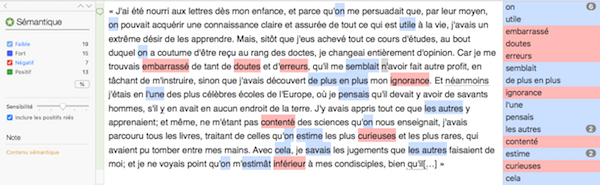
Excerpt from: “Discourse on the Method” by René Descartes
7 – All Guides
The various features mentioned above rely primarily on an incredibly rich knowledge base. Whether for general knowledge, solving a specific problem, or verifying a piece of information, Antidote’s guides are particularly useful. When it comes to spelling, there are always topics up for debate. An expression that sounds off, one that’s used too infrequently to be accepted by a certain audience, or simply a question about how to spell very specific things.

Excerpt from the guide to writing out amounts of money
For me, having spell-checking software is absolutely essential. A professional writer deserves to have tools that meet their needs.In that sense, Antidote saves me time every day, enhances my work, and serves as a resource for self-improvement.